Posts

Showing posts with the label technology

Data Representation

Image
Data Representation is mentioned in the primary curriciulum from Foundation to Year 6. In years F-4 it refers to how data can be represented referring to the use of symbols, images, text and numbers. In years 5-6 it is refering to the use of numbers specifically binary and computers use binary to store and transmit information. Data Representation is how data is represented and structured symbolically for storage and communcation by people and digital systems. Information can be transmitted with pictures and images, symbols, text and numbers. These images all represent stop.       National Simultaneous Storytime 2024 Bowerbird Blues by Aura Parker is about a bowerbird that collects blue things. Collect some blue things and use them to sort in different ways. This lesson includes: curriculum alignment for all states definitions lesson plan four sorting methods (3 sheets and 1 blank) assessment task The lesson is available  Teachers Pay Teachers   $4 US (abou...

Picture Books to teach Digital Safety

Image
Picture books are a wonderful way to engage children of all ages.  With younger children they provide an opportunity to engage in literacy with storylines they may not have experienced or thought about. With older students they are a wonderful hook to stimulate discussion or debate.  Is it true? Is it relevant to us? What can we do to protect? prevent? or follow up? Once upon a time Online by David Bedford Using fairytale characters this book illustrates some of the hazards of being online. The Fairy Godmother teachers them how to use screen time to be productive and creators rather than users of technology. The Fabulous Friend Machine by Nick Bland Popcorn the chicken finds a friend machine (phone) and makes some wonderful new friends, who turn out be not telling the full truth. Her old (true) friends step in to save her. The internet is like a puddle by Shona Innes This book gently talks about the dangers of being online and how adults can help us navigate those dangers. The...

Introducing Digital Systems to year 1/2

Image
Year 1 and 2 are required to " Recognise and explore digital systems (hardware and software components) for a purpose ( ACTDIK001 ) "  The Australian Computing Academy has unpacked what this means.  They need to " name digital systems (e.g. smart phone or laptop) that they interact with at home and school and recognise that they are digital systems" they also need to "play (with guidance) and use different systems to explore what they do and how they work. They match digital systems to specific purposes (e.g. using a phone to call a family member)." In NSW the above requirement is contained in the content of Outcome 11 in the Stage 1 Science and Technology Syllabus. ST1-11DI-T identifies the components of digital systems and explores how data is represented The purpose of the lessons below are to recognise and explore components of digital systems. Lesson 1 : Introduction Watch and discuss Read and discuss Hello Ruby, Journey inside a compute...

Micro:bit Firmware

Image
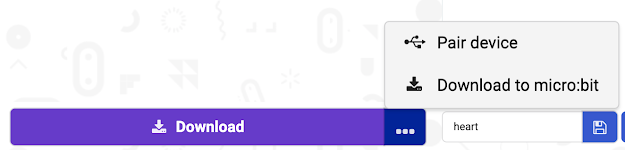
Did you know the Micro:bit requires firmware upgrades. Firmware is the operating system for the Micro:bit board. If you are getting unexplained errors when downloading programs it may be that your firmware is out of date. To check what version of firmware you are running there are 2 methods. Method 1 Plug in the Micro:bit to the USB port. Open the Block coding editor  https://makecode.microbit.org/#editor Click on the three dots beside the download button. Click on Pair device When you click on Pair device a window will pop up to prompt you to pair. Click on Pair Device . Then click on the device you want to pair from the list. Click on Connect. If you get this message below, you will need to update your firmware. How to video Under "Update Firmware" it will list the minimum firmware version you will need. Click on Check you firmware version here and update if needed." This will take you to the  support site  published by Micro:bit on how to troubles...

5 ways to know you are teaching computational thinking

Image
Computational thinking is a buzz word in many countries across the world. This blog gives 5 ways to identify if you are teaching computational thinking. The BBC website has a definition of computational thinking that clearly lays out the components of computational thinking. There are four components of computational thinking decomposition   - breaking down a complex problem or system into smaller, more manageable parts pattern recognition   – looking for similarities among and within problems abstraction   – focusing on the important information only, ignoring irrelevant detail algorithms   - developing a step-by-step solution to the problem, or the rules to follow to solve the problem Each cornerstone is as important as the others. They are like legs on a table - if one leg if missing, the table will probably collapse. Correctly applying all four techniques will help when programming a computer. You are teaching coding Coding is the most comm...

How can Teachers learn to code?

Image
Coding the latest buzz word There is an international movement to teach coding in schools, everyone is talking about coding, the media , schools , not-for-profits , summer camps , women's magazines . The difficulty is the responsibility for integrating coding into the curriculum falls on the teachers who are not all equipped with the skills to teach coding.  Why? Teaching coding skills is not about teaching everyone to be a programmer. It is about digital literacy and ensuring all students understand how technology works. It also teaches a thinking style referred to as "Computational Thinking". Computational Thinking  (CT) is the thought processes involved in formulating a problem and expressing its solution(s) in such a way that a computer—human or machine—can effectively carry out.  (Jeanette Wing 2-14) ( Source ) It was first referred by Seymour Papert in 1980 and then in 1996 and it is an important thinking style for solving complex problems.   ( Sourc...

Makey Makey Interactive Poster

Image
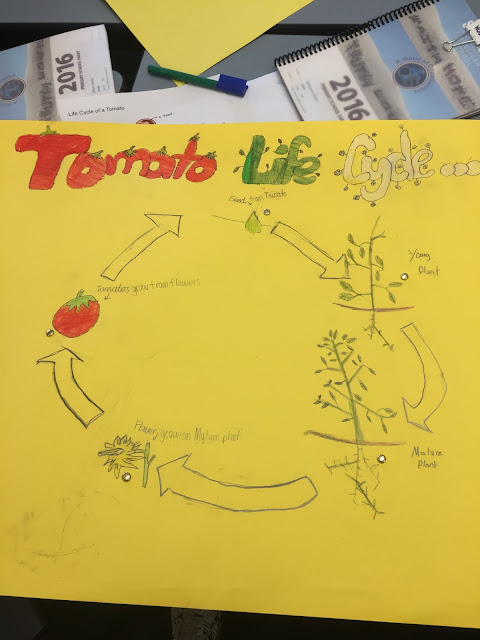
Updated September 2021 ----------------------------- The curriculum is overloaded, how to integrate new technologies and coding without adding additional content. The key is to integrate the ideas. This lesson took 2 hours and we completed it in one 2 hour session. Ensure you have equity with access to all tasks eg: boys don't dominate the using the technology while girls colour. Observe your students as some may need encouragement to do the coding and connect the Makey Makey. They may need some concrete scaffolding eg: provide them with a sample of code. Incomplete poster that shows the beginnings of lifecycle. Goal: Create a poster that illustrates the lifecycle of a tomato. The poster could be used to cover any outcomes or lesson ideas.  My Prelearning: 3 lessons Research on lifecycle of tomato Art lesson - still life on how to draw a tomato Design the Code - talk through with the students how to plant their code. When I press space Stop all other sounds Play ...