Posts

Showing posts with the label digital literacy

Digital Literacy and online testing: part 3
Image
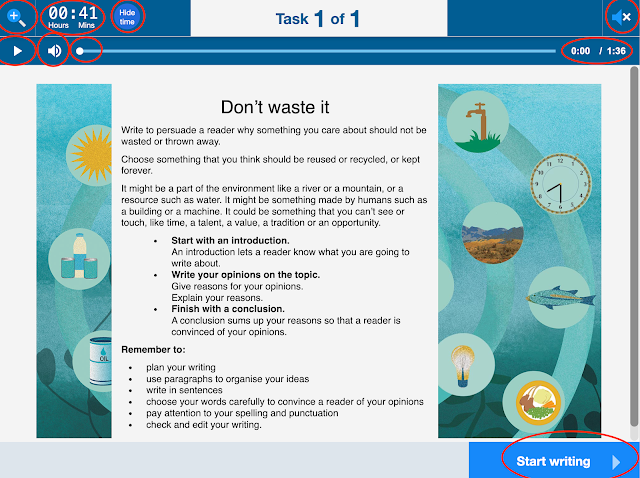
This post considers the online NAPLAN writing test using the public demonstration test . In this example the year 5, 7 and 9 writing tests for the narrative and the persuasive are the same question for all years. The main consideration for student success for an online writing test is their typing speed. Regardless of year level students must be able to type as fast as they can write. As they get older their typing speed must increase with writing speed. This means students should be taught to type from lower primary to ensure they have an acceptable typing speed and technique. Word processing skills are mentioned in the English curriculum documents across the country from years 1 to 4. Familiarity with using punctuation is also crucial for the writing test. Students must be able to locate and use: touch typing at the speed they can write - or faster capital letters full stop (which can be activated by pressing space twice) get to a new line using the enter or return key exclamation ma...

Digital Literacy and online testing: part 2

Image
This post considers the digital literacy skills required by year 5 students to complete the Numeracy NAPLAN test. Skills for year 5 numeracy navigate numbers to enter their 8 digit ID number enter numbers or text into an answer box click and drag pictures, objects and lines use a trackpad (if you don't have touch screen computers) or mouse turn the timer on and off use the play button to narrate the question show and hide the narration tool mute the narration tool adjust the volume of the narration tool show and hide the ruler use the ruler to perform measurements tilt the ruler identify radio buttons for a single choice identify check boxes for multiple choices use a drop down box and select a response be able to deselect an incorrect choice answer questions with a table or matrix of multiple answers use a zoom tool and turn it off understand the difference between highlight and a selection understand a selected answer is indicated by a double line around a section of screen be ab...

Digital Literacy and Online Testing: part 1

Image
This post considers how to improve performance in NAPLAN ( National Assessment Program – Literacy and Numeracy) by ensuring your students have the digital literacy skills to sit an online test. This post considers the year 3 reading test.  In year 3 the writing test is still paper based and the rest are online. From year 5 all tests are online including the writing test that is now typed. This introduces a standardised test that is inadvertently testing digital literacy and the question is...is your school teaching the skills your students need to answer the questions and have a fair go? For the year 3 reading test students need the following skills: navigate numbers to enter their 8 digit ID number enter numbers or text into an answer box click and drag pictures, objects and lines use a trackpad (if you don't have touch screen computers) or mouse turn the timer on and off identify radio buttons for a single choice identify check boxes for multiple choices be able to deselect an in...

Online Safety Resources

Image
  Teaching online safety is an important component of everyone being online. Below is a range of resources for teachers and school aged students K-12. Teacher Resources https://www.esafety.gov.au/educators/classroom-resources https://www.commonsense.org/education/digital-citizenship https://www.teacherspayteachers.com/Product/Activity-for-Goldilocks-A-Hastag-Cautionary-Tale-7269548 Games https://beinternetawesome.withgoogle.com/en_us/interland   https://www.commonsense.org/education/digital-passport   Books https://makecreateeducate.blogspot.com/2020/07/picture-books-to-teach-digital-safety.html https://thetweetinggalah.com/collections Fact checking sites https://www.snopes.com/   https://toolbox.google.com/factcheck/explorer/search/list:recent;hl=en Educate yourself Cybersecurity and Awareness - Free course from the University of Adelaide you will need a gmail

8 books for teaching Algorithms to children

Image
There is now a range of books both fiction and non fiction that teach about algorithms and coding concepts. These books can be used individually or in series. Picture Books If I were a wizard by Paul Hamilton Paul is an Australian author that has published a sweet story with Australian bush animals. Each page of the story introduces a coding concept. The back of the book has a brief definition of the concept and how it links to the story. This style of book is useful for teachers wanting to learn more about coding concepts and gives key terms that can be researched to find project ideas and further information. The concepts included in the story include: Repeats and Loops Sequence and Order Algorithms Variables Conditionals Functions Debugging and Patterns Paul's website includes additional resources that can be used in conjunction with the book, apps, augmented reality, games, and lessons.  https://www.wizardcodingbook.com/ This book would be suitable as a story ...

Response to Automation of teaching

Image
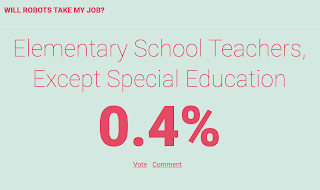
"Software doesn't have a day off"  Original Article If a teacher can be replaced by software they probably should be because teaching is about relationships. I don't believe robots can engage students like a quality teacher. Teachers are not glorified babysitters and it requires far more skill to be an effective teacher than technology companies and journalists will ever admit.  (This post is not going to discuss what makes a quality teacher. In every profession there are different levels of competency. We have all met good and bad doctors yet we don't lump all doctors in together with the bad ones. The same for teachers.) So many teachers have been reinventing the classroom, implementing technology, new teaching methods and using real world probably solving. Yet rarely do these stories make the news.  If you "google" teacher you are more like to get articles about misconduct than stories of achievement and success.  By replacing te...

Debugging programs for students by students

Image
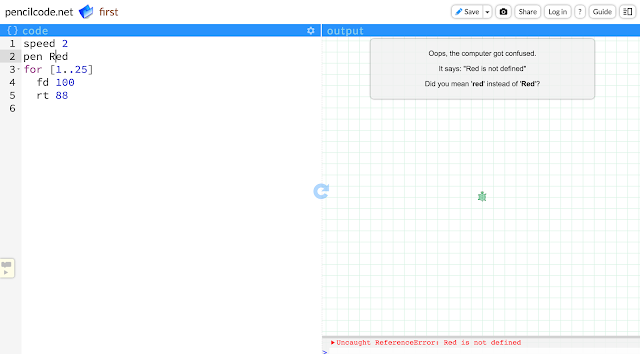
When creating projects using pencilcode.net one of my classes had some problems when the program would stop and get an error.  So they created a list of rules to help find the errors. We called it "debugging their program".  Things to look for with errors Highlighted row (2) Message on the right side in a grey box. Red writing in the bottom right with a description of the error. To create the rules students got into small groups (2-3 people) and opened a program that worked. Then they changed things in the program to see what would happen.  Please comment if you have some more rules that could be added. Rules for Pencilcode.net These rules are specific to pencilcode.net but they could be used as a guide for other programs. Check your spelling. Check your indenting & spacing. Use spaces between your words. Check punctuation eg: “ ”, (), [ ], { }, @, >, < Check the size of your jumps. Check the things you type. Check that you don’t p...