Posts

Showing posts with the label teaching

Digital Literacy and online testing: part 2

Image
This post considers the digital literacy skills required by year 5 students to complete the Numeracy NAPLAN test. Skills for year 5 numeracy navigate numbers to enter their 8 digit ID number enter numbers or text into an answer box click and drag pictures, objects and lines use a trackpad (if you don't have touch screen computers) or mouse turn the timer on and off use the play button to narrate the question show and hide the narration tool mute the narration tool adjust the volume of the narration tool show and hide the ruler use the ruler to perform measurements tilt the ruler identify radio buttons for a single choice identify check boxes for multiple choices use a drop down box and select a response be able to deselect an incorrect choice answer questions with a table or matrix of multiple answers use a zoom tool and turn it off understand the difference between highlight and a selection understand a selected answer is indicated by a double line around a section of screen be ab...

Digital Literacy and Online Testing: part 1

Image
This post considers how to improve performance in NAPLAN ( National Assessment Program – Literacy and Numeracy) by ensuring your students have the digital literacy skills to sit an online test. This post considers the year 3 reading test.  In year 3 the writing test is still paper based and the rest are online. From year 5 all tests are online including the writing test that is now typed. This introduces a standardised test that is inadvertently testing digital literacy and the question is...is your school teaching the skills your students need to answer the questions and have a fair go? For the year 3 reading test students need the following skills: navigate numbers to enter their 8 digit ID number enter numbers or text into an answer box click and drag pictures, objects and lines use a trackpad (if you don't have touch screen computers) or mouse turn the timer on and off identify radio buttons for a single choice identify check boxes for multiple choices be able to deselect an in...

8 books to introduce Activism and Sustainable Development Goals

Image
What are Sustainable Development Goals ? The 17 sustainable development goals have been set by the united nations as goals to be achieved by 2030. The SDGs are global goals set for various areas including humanitarian, environmental and economical. These goals are a great way to give purpose to student projects so they can address real world issues. Resources Song Ted Talk Introducing SDGs to students  To introduce SDGs to a class and ask them to research one each, then create a page in a floor book. (A floor book is an A3 sized page where student represent their findings, it is then compiled into a bound book and available for students to read).  Each time the class does research, or investigations asked students to identify which sustainable development goal the project is linked to. Books Greta and the Giants  by Zoe Tucker and illustrated by Zoe Persico is a fiction book about one girls fight again giants who are ruining the world. This story is based on Gre...

Introducing Digital Systems to year 1/2

Image
Year 1 and 2 are required to " Recognise and explore digital systems (hardware and software components) for a purpose ( ACTDIK001 ) "  The Australian Computing Academy has unpacked what this means.  They need to " name digital systems (e.g. smart phone or laptop) that they interact with at home and school and recognise that they are digital systems" they also need to "play (with guidance) and use different systems to explore what they do and how they work. They match digital systems to specific purposes (e.g. using a phone to call a family member)." In NSW the above requirement is contained in the content of Outcome 11 in the Stage 1 Science and Technology Syllabus. ST1-11DI-T identifies the components of digital systems and explores how data is represented The purpose of the lessons below are to recognise and explore components of digital systems. Lesson 1 : Introduction Watch and discuss Read and discuss Hello Ruby, Journey inside a compute...

Learning Functions with Microbit

Image
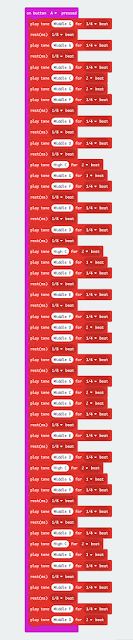
Ed update: This blog was published in MicroMag Issue 6 Nov 2016. The Microbit can be used to create music. I recently watched the MicroMonsters YouTube video. The video is easy to follow and the purpose of the video is to learn to use a Piezo speaker. So of course I composed the code but I found the code very long and complex. Then I wondered how can you simplify the code to make it shorter and easier to manage. Definition Functions are a way to store information that can called at anytime during the program. Functions remove the need to type the same code over and over and allow you to reuse repetitive pieces of code. This reduces the number of lines of code and errors. Example For example, the tune of Star Wars has several parts that are repeated throughout the song.  By creating a Function for each repeating part it is possible to use the function multiple times. This creates simpler code. The first phrase of Star Wars can be rewritten as SWIntro . It con...

Future Directions of Education - Part 1

Image
Current Trends in Education. Each year the Horizon Report  releases a summary of current and future trends in education. Many of the topics that feature in the report are discussed frequently by educators on Twitter and Google Plus. Key Trends Accelerating Technology Adoption in K-12 Education  Long-Term Impact Trends: Driving Ed Tech adoption in K-12 education for five or more years Rethinking How Schools Work: How do we reinvent the traditional classroom and the school experience? Pedagogy such as project based learning are already implemented in many schools. How do we take these pedagogies and remove restrictions such as timetables and bells. Schools like Delaney College in Granville, NSW, Australia have begun to implement a new approach to school using project based learning across year 7. Shift to Deeper Learning Approaches: The report includes examples of how schools are implementing different methods to achieve deep learning. A practical approach would be f...

Computational Thinking - an online course

Image
In 2015 SCAS launched student courses that use a blended format. A combination of face to face and online delivery. Year 8 have been offered the elective Computational Thinking. The course is being facilitated online over a semester and currently has five students enrolled. Students are timetabled to attend classes and all content is delivered via a Google Classroom and a Google Site. This class is still in it’s early days however the participating students are very enthusiastic about the course, it’s content and it’s delivery. This article will define computational thinking, outline the purpose of the course and offer reasons for the online format. The course being offered is cross curricular and offers the opportunity for students to develop skills in computational thinking, writing and reflection, covering outcomes from the English and Computer Syllabi. What is computational thinking? Computational Thinking is the process of finding a solution to open ended problems. Computation...